TikTok Video Editing Hacks: Pro Techniques to Make Your Content Stand Out
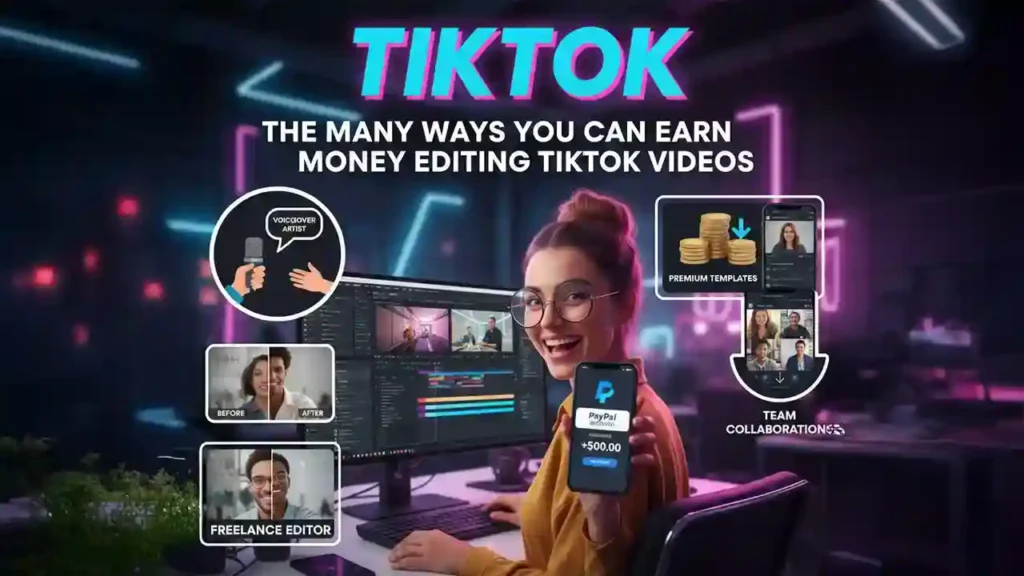
TikTok has become one of the most popular platforms for short-form video content, where creativity, pacing, and engagement determine whether your clips go viral or get overlooked. With millions of videos uploaded daily, standing out on TikTok means more than just shooting content on your phone — it requires smart editing techniques, strategic pacing, captivating transitions, and effective use of sound and visuals.
Whether you are a beginner creator or a seasoned influencer, mastering video editing hacks can dramatically improve viewer retention, engagement, and follower growth. In this post, we will share pro tips for editing TikTok videos that hold attention, guide you through ways to optimize edits for social engagement, and highlight the 5 best AI TikTok video editor tools to supercharge your workflow — starting with Invideo, a powerful solution built for quick, creative editing.
Why Editing Matters on TikTok
If TikTok is a stage, then editing is how you choreograph your performance.
Viewers scroll fast. Studies show that you have seconds to capture attention before viewers swipe to the next video. Good editing helps you:
- Create strong hooks that keep people watching
- Build rhythm and pacing that match the beat and mood
- Enhance storytelling even in 15–60 seconds
- Make complex ideas easy to follow
- Align audio and visuals for memorability
TikTok’s short format means editing is not just an afterthought — it is the foundation of engaging content.
Many creators turn to a TikTok video editor to implement pro techniques like dynamic cuts, motion effects, synchronized audio, and storytelling pacing that can make even simple videos resonate.
Pro TikTok Video Editing Hacks to Make Your Content Stand Out
Below are advanced editing hacks that top creators use to elevate their TikTok content.
1. Start With a Strong Visual Hook
The first 1–3 seconds determine whether someone keeps watching or scrolls past.
- Begin with close-up visuals, action, or movement
- Use motion or zoom at the start to pull viewers in
- Add eye-catching text that previews value (e.g., “Watch till the end”)
Think of the opening frame as an invitation. Editors often use quick cuts, shifting camera perspectives, or surprise visuals to grab attention before the main content begins.
2. Match Cuts to the Beat of the Audio
Rhythmic editing keeps viewers engaged. If your video has a soundtrack or music, align cuts or transitions with key beats or tempo changes.
- Use fast cuts on fast beats for energy
- Slow transitions on mellow beats for emphasis
- Sync motion effects with rhythm to create a seamless flow
Creators often import music into a video timeline, mark beats, and then cut footage to match these points. This creates professional-grade pacing even in short clips.
3. Use Text Overlays Strategically
Text overlays help convey context, clarify narration, and hook viewers who watch without sound.
Best practices include:
- Use large, readable fonts
- Place text near natural eye movement paths
- Add subtitles for narration
- Highlight key words with color changes or motion
Text is not just a caption — it’s part of your visual storytelling.
4. Add Motion Effects and Transitions Sparingly
Too many flashy transitions can be distracting, but the right effect at the right moment adds polish.
Editing techniques to use include:
- Zoom cuts to emphasize reactions
- Slide transitions to shift scenes smoothly
- Speed variations for dramatization (slow-mo or time-lapse)
Motion needs to support the story — not confuse the viewer.
5. Pace Your Clips for Engagement
TikTok videos perform best when pacing feels intentional:
- Keep clips short and purposeful
- Cut out dead space
- Build tension or curiosity before revealing a payoff
Experienced editors often trim clips at micro-levels, ensuring every frame adds value.
6. Layer Multiple Audio Elements
Audio is more than background music:
- Use narration for clarity
- Add sound effects for the mood
- Mix background music at low volume to maintain focus
Balancing multiple audio elements keeps videos immersive without overwhelming the viewer.
7. Color Grade for Emotional Impact
Color grading affects mood. Warm tones feel inviting, cool tones feel calm, and high contrast increases energy.
Even basic adjustments like brightness, exposure, and saturation can make content more visually appealing.
Top 5 AI TikTok Video Editor Tools
Using the right tools saves time and transforms editing from manual work into creative innovation. Below are five recommended tools, with Invideo in the first position.
1. Invideo – All-in-One AI TikTok Video Editor
Overview:
Invideo provides a streamlined editing experience as a powerful tiktok video editor that helps creators build TikTok content with professional appeal. With intuitive controls, automated enhancements, and AI-powered suggestions, Invideo makes it easy to produce compelling short-form videos.
Key Features:
- Auto scene structuring: Organizes content based on your script or footage
- AI voiceovers and narration support: Add clear narration without complicated recording setups
- Motion enhancement controls: Smooth transitions, pacing tools, and synchronized motion effects
- Advanced caption editing: Add, style, and sync captions for TikTok engagement
- Export options optimized for social formats: Includes vertical 9:16 exports ideal for TikTok
Why It’s Great:
Invideo helps creators focus on storytelling rather than manual editing. Its AI-enhanced workflow accelerates production by suggesting pacing, audio timing, and scene flow — reducing friction for creators who want high-quality output with minimal manual setup.
This platform also aligns with mobile creativity trends, supporting a free ai video maker app style workflow where users can manage and edit projects on the go.
2. VMake AI – AI-Enhanced TikTok Video Creator
Overview:
VMake AI uses artificial intelligence to help creators transform raw clips into polished social videos. Its motion analysis and automated timing tools help align visuals with audio for dynamic results.
Key Features:
- Intelligent pacing suggestions
- Audio beat detection for motion alignment
- Caption automation
- Quick export options for social platforms
Why It’s Useful:
VMake AI suits creators focused on quick turnaround and rhythmic edits that sync well with trend music.
3. VidGenius – Smart Short-Form Video Editor
Overview:
VidGenius brings AI to short-form editing by analyzing content and recommending cuts, overlays, and transitions that enhance viewer engagement.
Key Features:
- Scene scoring for viewer attention
- Automatic text placements
- Motion effect suggestions
- Optimal aspect outputs for TikTok
Why It’s Useful:
VidGenius helps creators experiment with multiple creative directions and test variations quickly.
4. FlowClip – Motion-First TikTok Video Editor
Overview:
FlowClip focuses on motion effects and automated transitions tailored for fast-paced short videos. It analyzes audio to recommend motion edits that feel natural.
Key Features:
- Beat-based transitions
- Motion guidance for dynamic pacing
- Auto subtitles
- Quick scene trims
Why It’s Useful:
Ideal for creators who want rhythm-driven edits without manual beat marking.
5. FlashCut AI – Rapid Short Video Editing Tool
Overview:
FlashCut AI simplifies social video editing with automated clip selection and pacing adjustments. It helps editors turn longer footage into short, engaging TikTok videos.
Key Features:
- Clip summarization
- Emphasis highlighting
- Motion suggestions
- Quick export presets
Why It’s Useful:
Perfect for creators repurposing longer content into short, shareable TikTok edits.
How to Combine Editing Hacks With AI Tools
Now that you know both the hacks and tools, here’s how to tie them together for standout TikTok content:
1. Start With a Hook in Your Script
Draft a script or outline that includes your hook in the first 3 seconds. Use your editor to place visuals or motion effects here.
2. Add Musical Sync
Import music and use the editor’s beat detection or manual marking tools to align clips with rhythm.
3. Use Text With Purpose
Add captions that emphasize key phrases, context, or CTAs — making videos accessible and engaging even without sound.
4. Pace Your Story
Split your video into logical segments — hook, build, reveal — and use motion effects where they strengthen storytelling.
5. Iterate and A/B Test
Create multiple versions with different cuts or motion styles, then analyze performance to refine future workflows.
Conclusion
TikTok success is not about shooting videos alone — it’s about smart editing that respects pacing, rhythm, audio, and visual attention. By implementing pro editing techniques and using powerful TikTok video editor tools like Invideo, creators can produce content that stands out, retains attention, and drives engagement.
Whether you’re a beginner learning your first motion cut or an experienced creator optimizing rhythm and pacing, the editing hacks and tools in this guide will help you create compelling videos that resonate on TikTok’s fast-moving platform.
Start using these editing techniques today and watch your content evolve into more engaging, shareable, and impactful creations.












Post Comment